APN configuration for IoT devices: a practical guide

Mikk Lemberg
Getting a cellular IoT device to register on a network is the easy part. Getting it to actually move data – that's where most deployments quietly fail.
In this article
- What is an APN and why it matters for IoT
- Public vs. private APN: which do you need?
- How to configure APN settings on a cellular module
- The most common APN mistakes
- APN configuration for global and multi-country deployments
- Troubleshooting APN and data session failures
- Frequently asked questions
- Key takeaways
What is an APN and why it matters for IoT
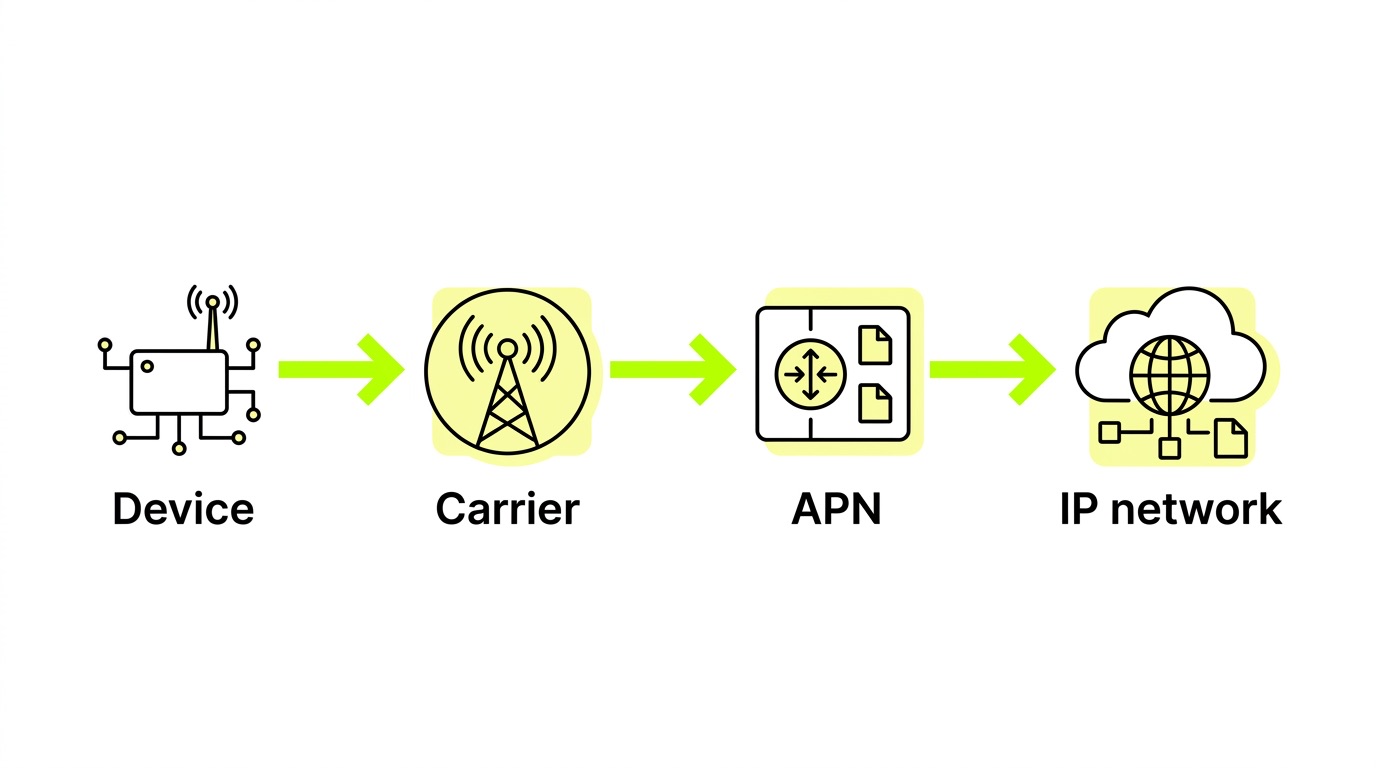
An Access Point Name (APN) is the gateway between a mobile network and an IP network. When your device initiates a data session, it presents the APN to the carrier, which then assigns an IP address and determines which security policies apply. Without a correctly configured APN, there is no data – full stop.
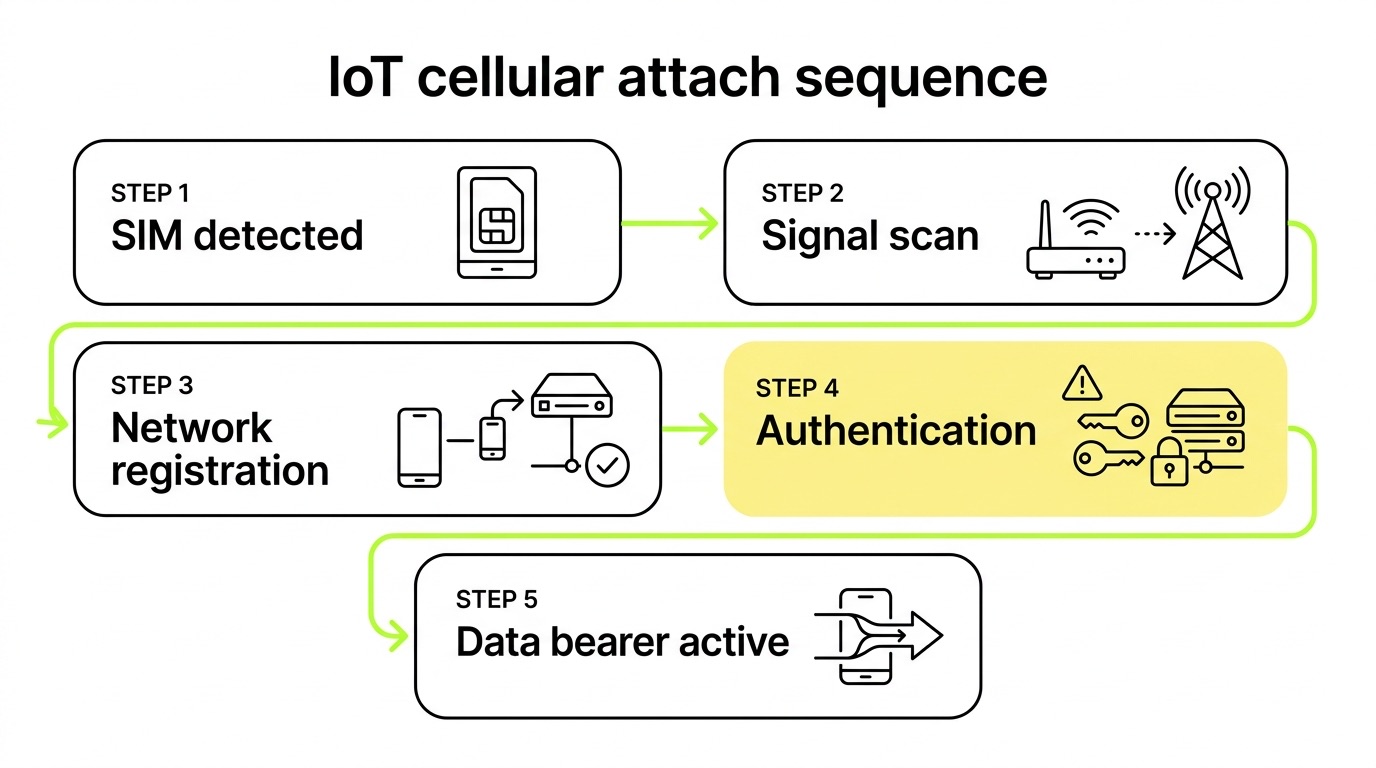
This distinction matters more in IoT than in consumer devices. Smartphones receive APN settings automatically via SMS from the carrier. Most IoT cellular modules – Quectel, u-blox, Sierra Wireless – do not. They require explicit manual configuration, and if that configuration is wrong, the device will appear connected (radio registered, SIM authenticated) while silently failing to transmit a single byte. It's a deceptive failure state that wastes debugging hours if you don't know what you're looking for.
For a deeper grounding in how network elements interact, the elements of IoT connectivity covers the full picture from SIM authentication through to IP assignment.
Public vs. private APN: which do you need?
The choice of APN type shapes your device's entire security and routing posture. There are four practical variants:
Public APNs route traffic through the carrier's shared internet infrastructure. They're the default for most SIMs and require no special provisioning. The trade-off is that devices share infrastructure with other subscribers and are exposed to the public internet.
Private APNs route traffic directly from the device into a customer's private network – the data never touches the public internet. This matters enormously for payment terminals, security cameras, and any application handling sensitive data. Only SIMs explicitly provisioned on the private APN can use it, which is a meaningful security boundary in itself.

It's worth noting that a private APN and a VPN solve related but distinct problems. A private APN operates at the network level, keeping traffic isolated by design. A VPN adds an encryption layer over a public connection. Many production deployments – payment terminals, connected vehicles – use both. For how these combine in practice, real-world APN and VPN deployment examples across eight different IoT verticals is a useful reference.
How to configure APN settings on a cellular module
APN configuration happens at the modem level using AT commands sent over the module's serial interface. The core command is AT+CGDCONT, which defines the PDP context – the data session profile that tells the module which APN to use and what IP protocol to expect.

Basic configuration steps
- Open a serial connection to the module via UART or USB debug interface.
- Define the PDP context using the appropriate AT command:
AT+CGDCONT=1,"IP","your.apn.here" - Set authentication credentials if required (PAP or CHAP):
AT+CGAUTH=1,1,"username","password" - Activate the PDP context:
AT+CGACT=1,1 - Verify IP assignment:
AT+CGPADDR=1 - Check network registration state – use
AT+CEREG?for LTE orAT+CGREG?for 2G/3G. A+CEREG: 0,1response confirms registered on the home network;0,5confirms roaming.
Authentication type matters more than most engineers expect. PAP sends credentials in plaintext; CHAP uses a challenge-response mechanism and is preferred for private APNs. A mismatch between what the module sends and what the carrier expects causes PDP context activation to fail silently – the device stays registered but no data session opens. The symptom looks identical to a hardware fault, which is what makes it so easy to misdiagnose.
For a practical walkthrough of AT commands including network registration checks, the beginner's guide to AT commands is worth bookmarking for your team.
The most common APN mistakes
In our experience supporting deployments across hundreds of hardware variants and carriers, APN misconfiguration is the single most frequent root cause of devices that appear connected but aren't transmitting data. The failure mode is deceptive precisely because radio registration succeeds – the SIM is authenticated, signal indicators look fine – while the data plane breaks silently at the GGSN/PGW level.
The mistakes we see most often:
- Incorrect or missing APN string – Typos, incorrect capitalisation, or a blank APN when one is required. Some carriers are case-sensitive. A blank APN works on some networks that auto-assign a default bearer, but fails on others with no clear error.
- Wrong authentication type – Using PAP when the carrier expects CHAP, or including credentials when none are required. Either causes PDP activation to fail without an obvious reason in device logs.
- Private APN credentials not applied after SIM swap – A new SIM arrives provisioned on a private APN, but the device firmware still holds the old public APN. The device registers, fails to open a data session, and the investigation spirals into hardware diagnostics before anyone checks the APN string.
- APN not updated when moving to a new carrier or country – A SIM that worked perfectly in one market fails in another because the APN string is carrier-specific and wasn't updated in firmware before deployment.
- Retry loops without backoff – When PDP activation fails, modules that immediately retry in a tight loop can trigger signalling storms, exhaust battery, and in some cases cause the SIM to be suspended by the carrier for excessive signalling.
That last point deserves emphasis. A misconfigured APN doesn't just mean a device that's offline – uncontrolled retry behaviour can escalate into an operational incident affecting the entire deployment and requiring carrier intervention to resolve.
APN configuration for global and multi-country deployments
Single-country deployments are relatively straightforward – one carrier, one APN, configured once. Global deployments are where APN management becomes genuinely complex.
The core problem is that APN strings are carrier-specific. A device deployed across 20 countries with 20 different local SIMs would traditionally require 20 different firmware configurations, or a firmware update process at each transition. Neither is practical at scale. We've seen this catch OEMs off guard at exactly the wrong moment – when they're ready to ship at volume and realise their firmware is hardcoded for a single market.
There are three approaches to managing this:
- Single universal APN – Some connectivity providers issue SIMs that use a single APN string across all markets. The device is configured once and the carrier handles routing regardless of which network the SIM attaches to. This is the cleanest solution for global IoT deployments and the one we recommend when it's available.
- OTA APN updates – APN settings are pushed to the device remotely when a SIM transitions to a new carrier profile. This works but requires reliable remote management infrastructure and introduces a window of downtime during the update.
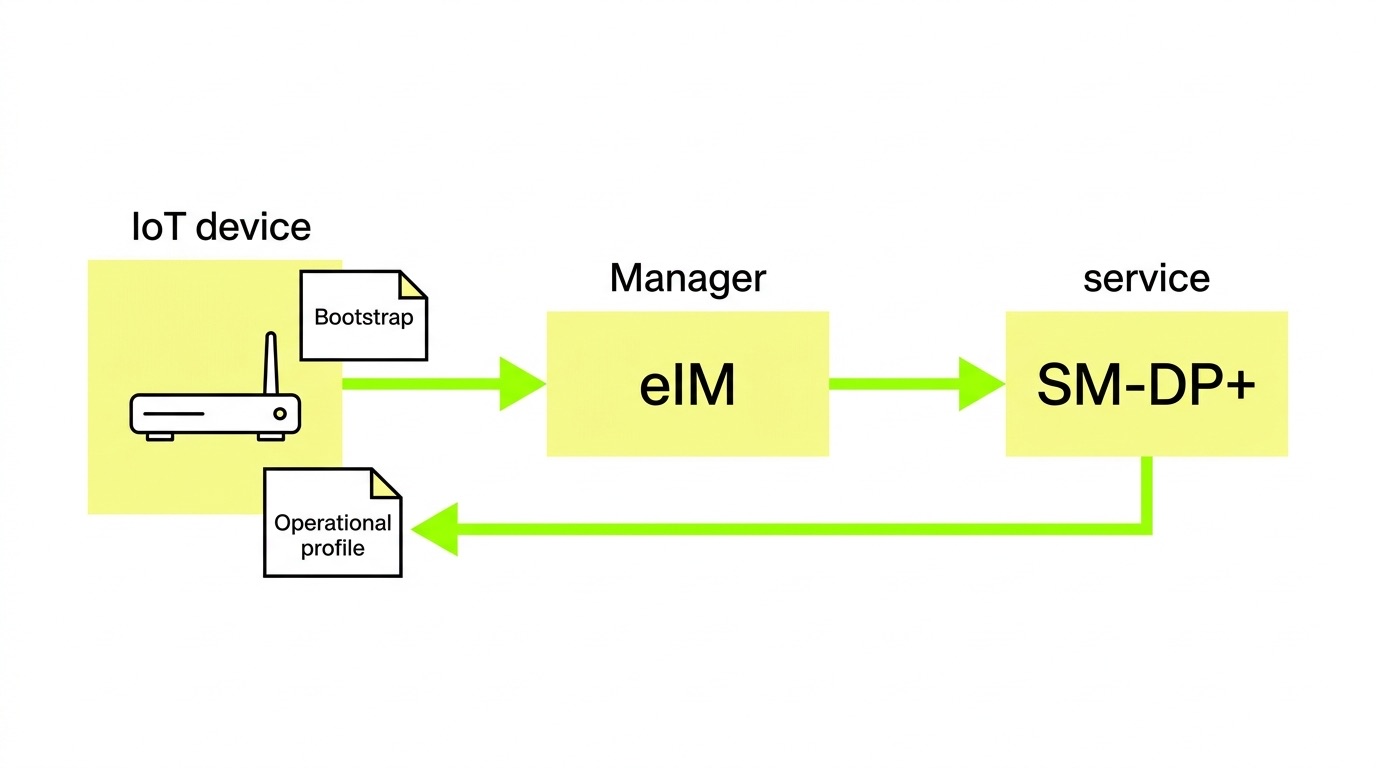
- eSIM with local profiles – An IoT eSIM can switch carrier profiles over the air, enabling the device to use a local network in each market rather than roaming. Local profiles carry their own APN settings, reducing or eliminating roaming costs while keeping device-side configuration consistent.
The eSIM approach has a practical advantage beyond APN management alone. Roaming SIMs are at risk of attach rejects on networks that flag permanent roaming – a problem that has become more significant in certain markets. Local profiles sidestep this entirely. The 1oT M2M eSIM platform supports remote profile switching with no physical SIM swap required, which is the only realistic option for devices already in the field.
For any global deployment, validate the APN and data session in each target market before scaling. NB-IoT networks in particular have known PDN rejection issues when APN configuration doesn't precisely match carrier expectations – behaviour that won't surface during a domestic lab test.
Troubleshooting APN and data session failures
When a device registers but produces no data, work through the failure systematically before escalating.
- Confirm radio registration first – Run
AT+CEREG?orAT+CGREG?. If the device isn't registered, the problem is upstream of APN configuration entirely. - Check the PDP context definition – Run
AT+CGDCONT?to print the current configuration. Verify the APN string matches exactly what the carrier requires, including capitalisation. - Attempt manual context activation – Run
AT+CGACT=1,1and observe the response. An error code here points to carrier-side rejection: wrong APN, wrong auth, or SIM not provisioned for data. - Verify IP assignment –
AT+CGPADDR=1should return an IP address. No IP means the data session never opened successfully. - Isolate hardware from SIM – Move the SIM to a smartphone. If data works there, the module configuration is the problem. If it doesn't, the issue is SIM provisioning or carrier account setup.
- Check for retry loops – If the module is logging repeated activation attempts in quick succession, implement exponential backoff in firmware. Immediate retries on failure are a common firmware design mistake that compounds the problem.
- Reset the modem state – A full modem reset (
AT+CFUN=0followed byAT+CFUN=1) clears the PLMN selection and forces a fresh network scan, which resolves stuck attach states on some modules.
For private APN deployments specifically: confirm with your connectivity provider that the SIM is explicitly provisioned on the correct APN before testing the device. Correct device-side configuration will still fail if the carrier-side provisioning hasn't been completed. These two checks are independent, and skipping either one wastes time.
Frequently asked questions
Why does my device show network registration but no data?
This is the classic APN misconfiguration symptom. Network registration and data session activation are separate processes. The device has successfully authenticated on the radio network – SIM is valid, signal is present – but when it attempts to open a data session, the carrier rejects the PDP context because the APN string, authentication type, or credentials don't match what's provisioned on the carrier side. Run AT+CGDCONT? to check your configured APN against what the carrier requires, and verify authentication type separately.
Do I need a different APN for each country?
Not necessarily, but it depends on your SIM provider and connectivity architecture. Some providers issue SIMs with a single APN that works across all their partner networks globally – this is the simplest approach for multi-country hardware. If you're using local SIMs per market, or if your provider routes differently per region, you may need per-country APN configurations. eSIM with local carrier profiles can handle this transparently, with each profile carrying the correct APN for its network.
How do I configure APN settings without physical access to a deployed device?
For devices already in the field, APN settings need to be pushed remotely – via SMS-based AT command tunnelling, a device management agent running on the module, or over-the-air profile updates via eSIM. This requires remote management infrastructure to be designed in before deployment. Retrofitting remote APN management onto a deployed fleet that wasn't built for it is genuinely difficult, which is why planning for a remote update mechanism before shipping matters as much as getting the initial APN right.
Key takeaways
- Network registration and data session activation are separate processes – a registered device is not a connected device. APN misconfiguration causes the second to fail while the first succeeds, making the failure hard to spot without systematic diagnosis.
- The most common failures are preventable – wrong APN string, PAP/CHAP mismatch, and missing private APN provisioning account for the majority of deployment issues we see across hardware variants and markets.
- Global deployments need a deliberate APN strategy – whether a universal single-APN SIM, OTA configuration updates, or eSIM with local profiles. Assuming one firmware configuration works everywhere is the fastest route to a scaling problem.
- Implement exponential backoff for failed PDP activation attempts – tight retry loops cause signalling problems that escalate quickly and can result in SIM suspension.
- Validate APN and data session in each target market before scaling – LTE, NB-IoT, and LTE-M networks behave differently even within the same carrier. Testing in production conditions before fleet deployment catches problems while they're still recoverable.
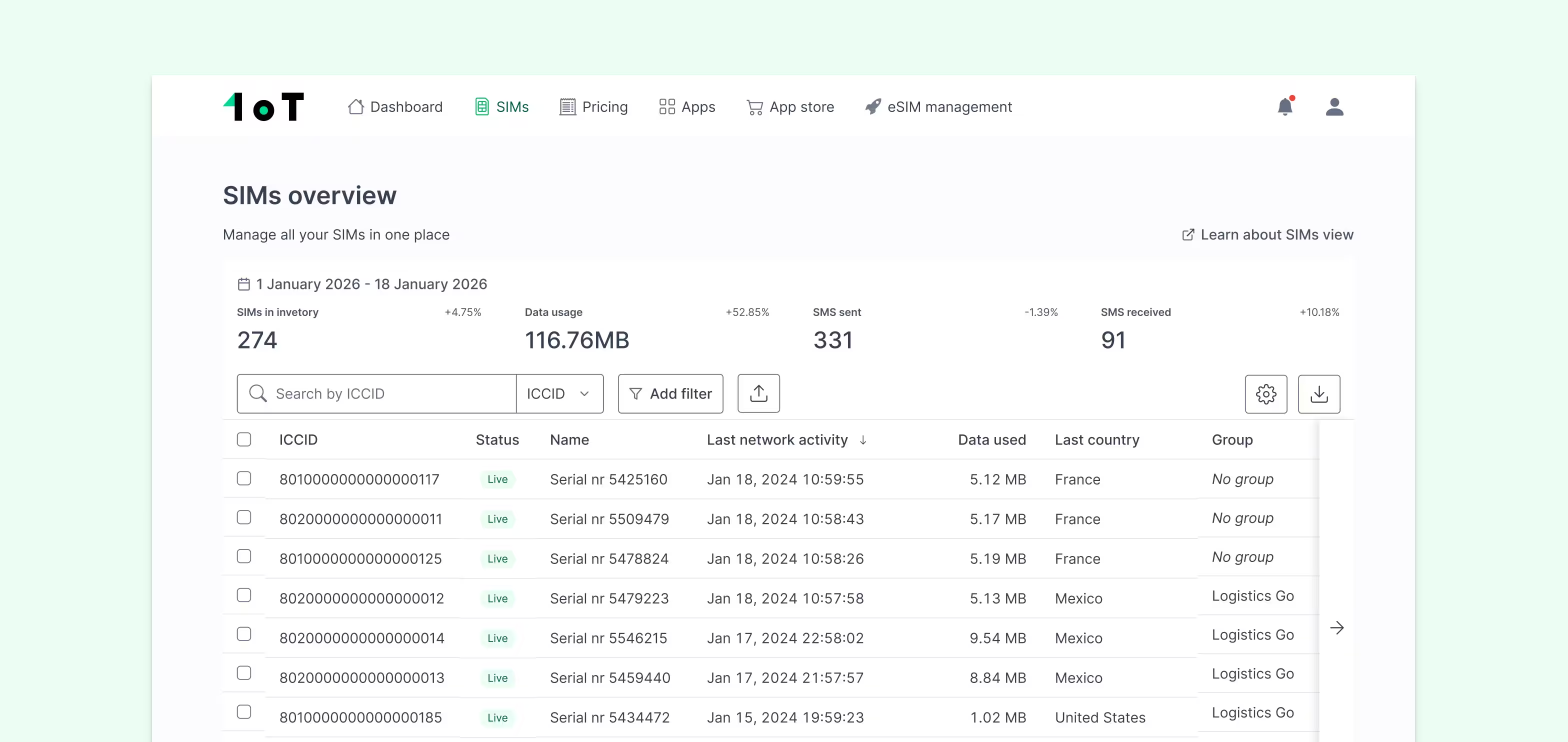
If you're scoping a new deployment or troubleshooting an existing one, 1oT's global IoT connectivity platform includes SIM management, real-time usage visibility, and eSIM profile switching that makes APN-related failures significantly easier to identify and resolve at scale. Talk to the team to discuss your specific deployment requirements.









.avif)



.avif)